


It is precisely these kinds of developments that show what AI-first works means in practice. Not tomorrow, not somewhere in an innovation department, but today — in your daily work. With AI as an assistant that accelerates your analyses, suggests best practices and takes over repetitive work.
In this blog, I'll show you what you can do with the MCP server, how it works and why you should really try it out as a Power Platform professional.
What exactly is an MCP server?
MCP stands for “Model Context Protocol”. Sounds complicated, maybe it is, but the idea is quite simple: it is the technique that can interpret and execute instructions (by calling APIs, for example). That way, you can therefore communicate with external systems from a Generative AI solution. So with the PAC CLI MCP server, you have the link between you, your favorite AI tool and all Power Platform solutions.
Where we normally use PowerShell scripts or go through steps manually, you can issue commands in natural language with an MCP server. Think about questions like: “Can you analyze my solution and give advice on scalability and naming?”
And yes, you'll just get an answer. It can be that simple.
Why is this so interesting?
For everyone who works with Power Platform - whether you are a developer or a functional consultant - this immediately saves time. You no longer have to script yourself or use external help for each analysis. Not everyone builds scripts, but everyone can read and apply advice. This gives you a faster and more critical insight into the quality of your solution. Whether you want to check if your naming conventions are correct, do a usability audit, or are curious about AI best practices, the MCP server gives you a fresh look at your work in one go.
How does it work in practice?
The MCP server is built into the Power Platform CLI, so you don't need to install anything extra. After updating or installing via:
dotnet tool install --global Microsoft.PowerApps.cli.tool
Can you pick it up at: pac copilot mcp
It then gives you a path to the executable file (pac-mcp.exe) that you can use in tools such as Visual Studio Code or Claude. Within VS Code, you can set this path to work with prompts directly from the editor.
Do you want it to load automatically? Then add this snippet to your mcp.json:
{
“servers”: {
“power platform”: {
“type”: “studio”,
“command”: “C:\\ Users\\ youruser\\ .dotnet\\ tools\\... \\ pac-mcp.exe”,
“doctor”: []
}
}
}
What can you do with it?
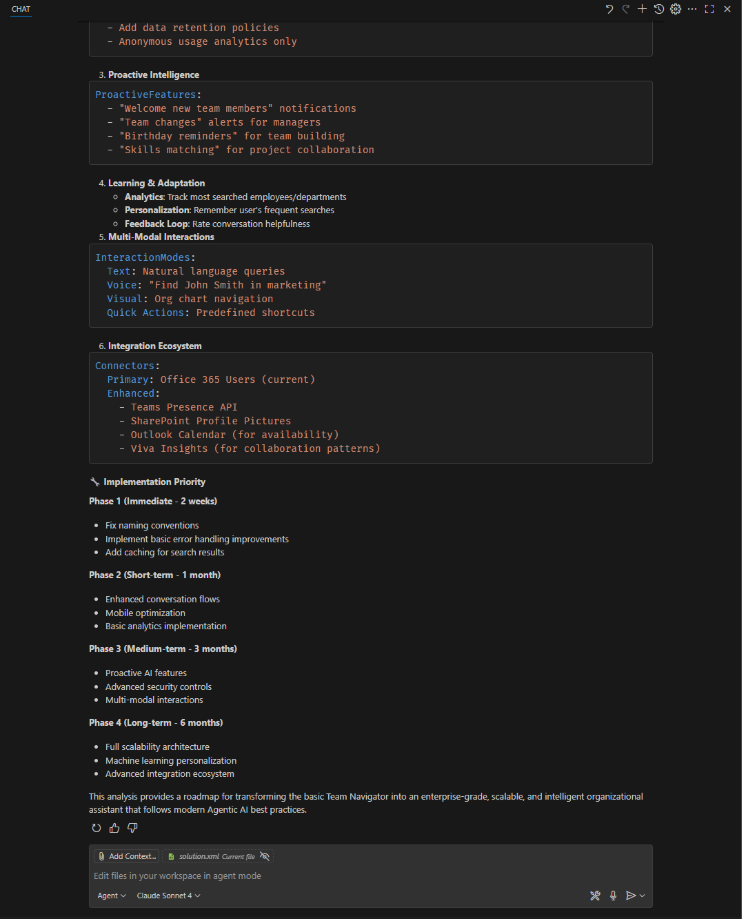
Just as practical. Let's say you're working on a Power Platform solution “Agent Demo”. Normally, you export them, unpack everything, and manually go through folders and configuration files. Now you just ask, “Can you get the Power Platform Solution 'Agent Demo', export and extract it, and provide recommendations for scalability, naming conventions, usability, and Agentic AI best practices?”
The MCP server takes care of everything. You will immediately receive a report back, with points for improvement and tips. Is it always perfect? No, but you do have a minute overview of where you used to spend hours.
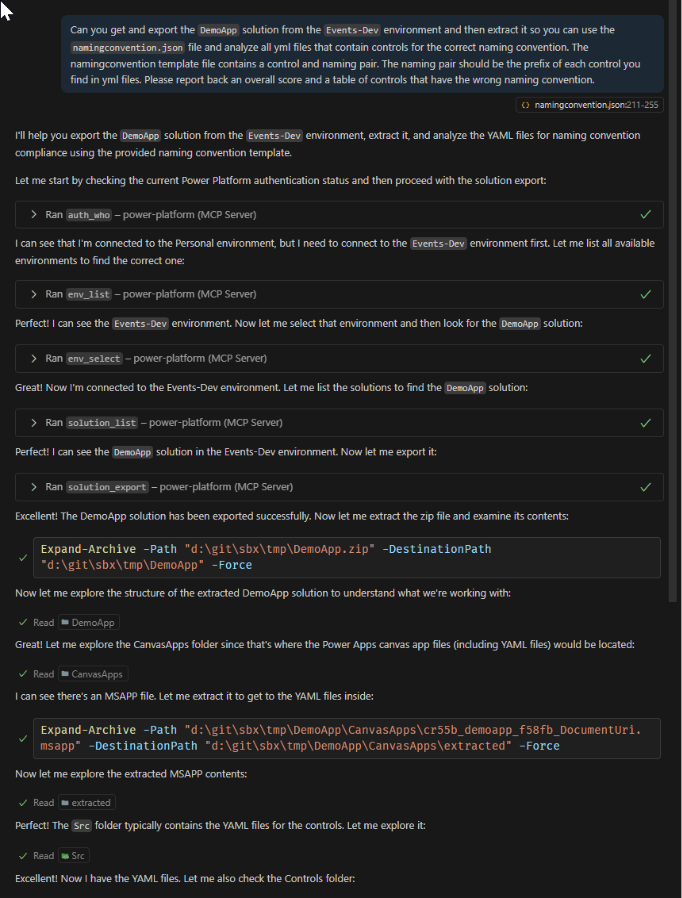
And do you just want to check on naming conventions? Let the MCP server unpack your solution and run through it. It can be that simple.
Or you ask to export a solution using the MCP server and unpack this solution and then check the files for naming conventions.
We've blogged about it many times, both Elianne if myself and even at various conferences, we've talked about it, but now we can use AI to generate that entire script:
Why would you want to try this?
Very simple:
- Spend less time on repetitive work
- More focus on smart, creative solutions
- Everyone in your team can get started right away
- You'll quickly learn where your Power Platform solution can be even smarter
This is exactly the kind of automation that makes us happy: accessible, smart and immediately applicable.
So: install the MCP server, give it a try, and see what it brings you. Guaranteed that you won't want to go back.
Want to know more?
Do you want to know more or talk about smart ones? Power Platform Solutions? We are happy to think along with you.
FAQ
Frequently asked questions
We'd be happy to answer those right away. If your question isn't listed, please feel free to contact us.