


In practice, many AI initiatives get stuck at exactly this point. Not because the AI is deficient, but because fundamental architecture choices were made too late. A working demo is not yet a working solution. Especially with agents, you need to design consciously from day one.
In the booklet Building AI Agents on Power Platform we describe seven architectural principles that help you do that.
1. Start with a Solution
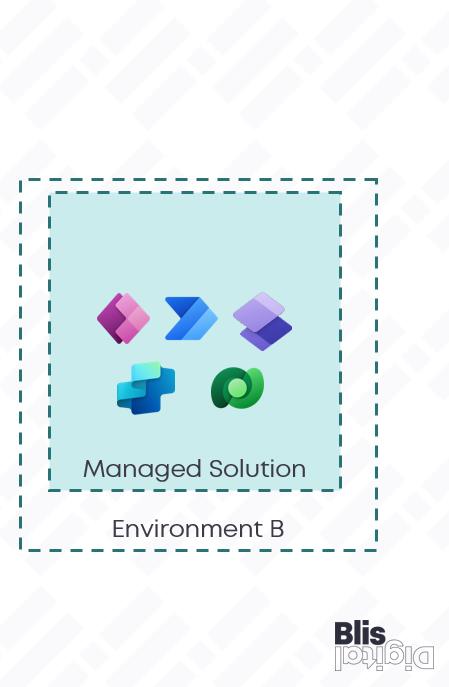
This sounds like an open door, but I see it going wrong too often: people build agents separately from their flows, connectors and data. That doesn't work. Always use a Power Platform Solution to keep everything together. A Solution bundles your agent, flows, connectors, tables, and configuration into one package.
Why is that important?
- Portability: You build in development, test in acceptance, roll out to production. With a Solution, you can export everything at once. No separate parts that you have to rebuild manually.
- Version control: You want to know which version of your agent is running where. A Solution provides insight into that. You publish a new version, test it, and if it goes wrong, roll back to the previous one.
- CI/CD pipelines: If you're serious about building agents, automate deployment. With Solutions, you can automatically roll out pipelines to different environments via Azure DevOps or GitHub. This saves time and prevents errors.
If you're already working with Power Platform, you're probably already doing this. But if not, this is step one.
2. One scenario, one agent
An agent can easily have a chat interface. In fact, that's often the most natural way to communicate with an agent. But the difference with a chatbot lies in what happens behind that chat. A chatbot provides information, an agent performs actions. He calls flows, adjusts data, sends notifications, creates tickets. That's why you're building a separate agent for each scenario.
I often see a tendency to build multiple functions into a kind of “super-agent”. HR, IT, finance, facilities - all in one conversation. That seems efficient, but it is not. Such a mega-agent becomes uncontrollable. The prompts become too complex, the flows too branched and the user gets lost in a conversation that goes in all directions.
Instead, create a separate agent for each scenario. An HR agent for leave and absenteeism. An IT agent for passwords and access. A finance agent for reports and claims. Small, organized, with a clear purpose. When scenarios overlap, let agents work together via orchestration. We will come back to that later.
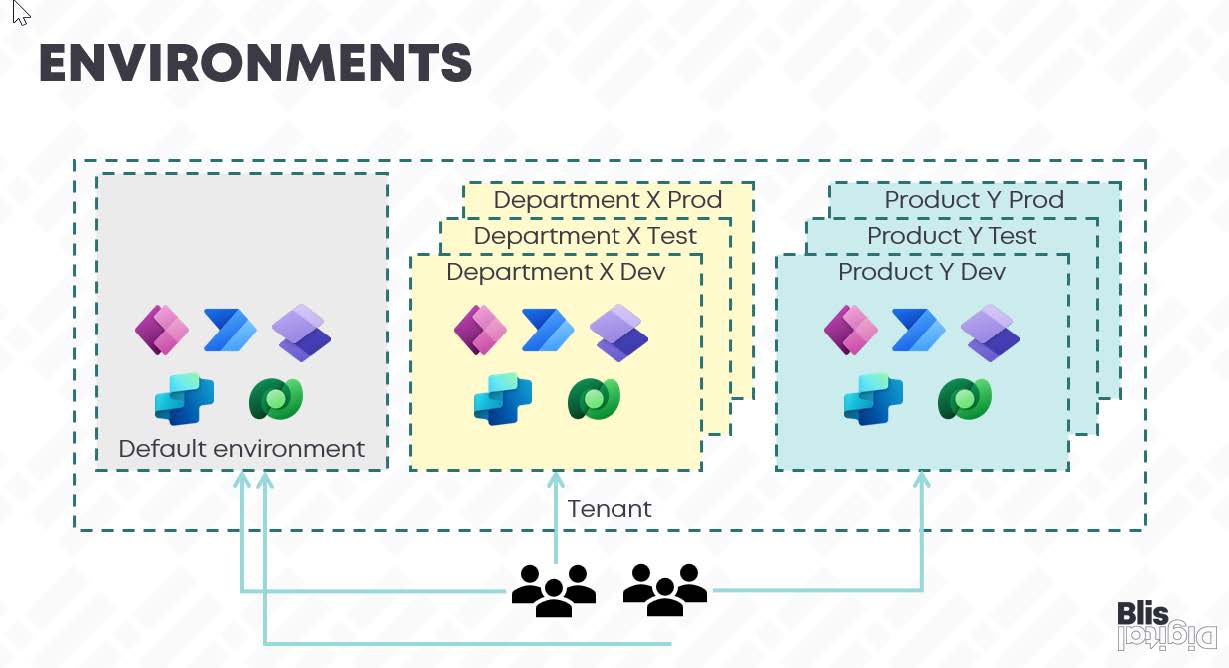
3. Use separate Environments
Development, testing and production should be separate. Always. You don't want a test agent to accidentally change real data or send emails. In Power Platform, you can arrange that with Environments: separate environments with their own data, own security and configuration.
My advice: use at least three environments. Development for building and experimenting. Validation test and user acceptance testing. Production for live use.
Limit role-based access per environment. Developers are allowed to do everything in development, but not in production. End users only see production.
And set the appropriate Data Loss Prevention (DLP) policies for each environment. These policies determine which connectors can work together. For example, you want your agent to extract data from Dataverse, but you don't want it to just send it to an external API. DLP prevents that.
4. Understand the impact of DLP policies
DLP policies are not a formality. They literally determine what your agent can and cannot do. An agent that retrieves data from Dataverse and also uses Outlook can be blocked if those connectors are not in the same policy group. And an agent talking to an external API via a Custom Connector requires explicit permission.
So make an inventory of which connectors you need beforehand. Talk to your Power Platform admin. And test your agent in all environments, because DLP policies can vary by environment.
5. Choose your connectors consciously
Copilot Studio works with standard connectors. They are built-in and do not require an additional license. Often, these connectors do what you want, but sometimes you need more, such as connectors for legacy systems or external APIs, and there are also premium connectors that offer advanced functionality. If you choose to build or buy connectors, it costs money and requires management
My advice: only use what you really need. Less is more. Each connector is a dependency, a potential risk point, and something that needs to be maintained. Keep it simple
6. Document everything
This sounds boring, but it's crucial. Make sure you know for each agent which connectors and actions are being used, what data is being read or written, and what fallback or escalation paths there are. Why? Because in three months, you'll forget how it works. And because someone else may have to take over.
Documentation doesn't have to be fancy. A README in your Solution with an architecture sketch, dependencies and contacts is all it takes. By the way, this is only possible if you have enabled source code integration, so we do that by default. The point is that someone who didn't build the agent still understands what they're doing and how.
7. Manage agents as software
Agents are software. Treat them like this too:
- Use Application Lifecycle Management (ALM): commit changes to source control, use deployment pipelines, plan updates and rollback scenarios. This isn't overkill, this is working professionally.
- Security by design: Authentication and authorization are no extra. Who can start the agent? What can the agent do on behalf of a user? Use Azure Key Vault for secrets, restrict role access, and log everything the agent does.
These seven principles have one common message: it's best to build quickly, but only if your foundation is right. Otherwise, you are not accelerating, but moving complexity to later. And later is always more expensive with agents, because the consequences are greater.
Do you want to see this entire foundation developed step by step, including the practical choices and examples on Power Platform? Then read the book Building AI Agents on Power Platform. It's written for creators who don't want to talk about possibilities, but want to build agents that can run in production tomorrow.
Download the practical guide and build agents who are allowed to go live
FAQ
Frequently asked questions
We'd be happy to answer those right away. If your question isn't listed, please feel free to contact us.